💡 Recommendation: use the ** Google Chrome** browser.
¶ 🧠 Darwin Platform
Updated: July/2026
Platform for store monitoring, auditing, and remote operation,
integrating video, data, and automation.
📌 This guide is a reference for Darwin topology and deployment for the sales team, clients, and technical teams — from the initial survey to operation.
¶ 🧭 Where to start
| Profile | Start with |
|---|---|
| 🤝 Sales | Darwin Products → Configurations → Sizing → Sales Checklist |
| 🏬 Client / Store IT | Infrastructure → Network & Communication → Approved Recorders |
| 🖥️ Operation (monitors and supervisors) | Remote Operation → Best practices |
| 🔐 Information security | Data Protection and Operational Continuity |
¶ 🎯 How Darwin works
Darwin connects the store's main elements:
- point of sale (POS)
- cameras (CCTV)
- devices (EAS, scale, audio)
- local server
👉 All integrated to generate:
- operational auditing
- real-time monitoring
- event analysis
¶ ⚙️ Operation models
¶ 📦 D+1 Auditing
Analysis based on recordings.
¶ 📞 Remote Monitor
Real-time action with video and voice.
⚠️ All equipment must be on the same switch.
¶ 📦 Darwin Products
¶ 🧠 Product Line and Capacities
| Product | Code | Description | Operation | Cart | No Scan | Capacity |
|---|---|---|---|---|---|---|
| Darwin Bridge | 5854 | Standard Darwin server | 🟢 | 🔴 | 🔴 | up to 64 operations |
| Darwin Bridge | 5854 | Standard Darwin server (No Scan mode) | 🟢 | 🔴 | 🟢 | up to 48 operations |
| Darwin AI | 6077 | Server with AI (GPU) | 🟢 | 🟢 | 🔴 | up to 16 AI points |
| Darwin AI | 6077 | AI-only server (GPU), no operation | 🔴 | 🟢 | 🔴 | up to 30 AI points |
💡 Legend: 🟢 available · 🔴 not available
¶ ⚙️ Server operation configurations
The Darwin server can run in different configurations, depending on the features enabled in the store. What changes between them is the GPU requirement and the point capacity.
| Configuration | Server | GPU | Capacity |
|---|---|---|---|
| Darwin Operations (auditing + remote monitor) | Darwin Bridge | 🔴 | up to 64 points |
| Darwin Operations + VoIP | Darwin Bridge | 🔴 | up to 64 points |
| Darwin Operations + VoIP + No Scan | Darwin Bridge | 🔴 | up to 48 points |
| Darwin Operations + VoIP + Cart | Darwin AI | 🟢 | up to 16 points (total) |
| Darwin Cart only (no operations) | Darwin AI | 🟢 | up to 30 AI points |
💡 GPU: 🟢 required · 🔴 not required
The EAS (anti-theft) integration is a layer that combines with any of these configurations — each antenna enters the system as a POS (see EAS section).
💡 Point = each POS or active resource (operation, No Scan, Cart point, EAS antenna...). Everything active in the store is summed for sizing.
⚠️ Have Cart? The server is Darwin AI (with GPU). Without Cart, the Darwin Bridge handles it. Above 16 points on the shared server, you must separate: a Darwin Bridge for operations and a dedicated Darwin AI for the Cart (up to 30 AI points). This goes into the project from the survey, never as a last-minute upgrade.
¶ 📐 Sizing for stores with many POS
The Darwin Bridge remains the store's standard server. What changes in large stores is the sizing of the AI (analytics) part:
- Up to 16 AI points → the Darwin AI handles it, combining operation and analytics
- Above 16 AI points → a dedicated Darwin AI for AI (no operation) must be added, supporting up to 30 AI points (analytics)
⚠️ In stores with more than 16 analytics points, the project must plan for the dedicated AI server from the initial survey (sales checklist).
⏱️ The Cart uses AI, which needs up to 30 days of training after the complete installation (server + cameras + network) to go live. Align the go-live with the client at the point of sale. Cart projects leave the factory already installed by the AI team (Team Deep Learn).
¶ 📡 Solution Components
¶ 🎥 CCTV
- IP or analog cameras
- continuous recording
- basis of auditing
¶ 🔐 EAS (Anti-theft)
Darwin integrates with the store's anti-theft system, recording each trigger together with the video of the moment.
Integrated equipment:
- AM Antenna and RF Antenna (Rx10) — located at the store exits. When a non-deactivated tag passes, the alarm triggers and Darwin records the event with the video of the moment.
- AM Deactivator — located at the checkouts (POS). Deactivates the tag at the moment of purchase; Darwin records each deactivation and cross-checks it with the sale.
- Metal Alarm — triggers become events within Darwin, with date, time, and associated camera.
📌 Each antenna enters the system as a POS (with a camera in Janus). It must therefore be included in the sales checklist and in the store's point survey.
Hardware requirement: Web Enable module with firmware 2.0 or higher (in earlier versions, part of the configuration cannot be completed).
Exception rule modes:
- EAS — generates an exception on any trigger of antenna, metal detector, or deactivator.
- EAS without record — tag deactivation (PAD1 or PAD2) without a registered sale.
- EAS without record P.A.R — deactivation without sale of a P.A.R product (high value, small size, and high demand).
👉 With this integration you can audit alarm triggers, check whether the tag was correctly deactivated at the checkout, and separate operational error from possible fraud.
¶ ⚖️ Scales
- Toledo Prix 5 Plus or higher
- integration via MGV7
¶ 📞 Telephony
- SIP (VoIP)
- remote action
¶ 🎥 CCTV – Approved Recorders
📌 Use equipment compatible with the client's environment.
⚠️ In scenarios with multiple recorders, keep the same manufacturer.
¶ 🔹 Hikvision
- greater network and bitrate control
- better fine-tuning
- more predictable
👉 Recommended for more critical projects
¶ 🔹 Intelbras
- simpler configuration
- more automatic operation
- fewer adjustments
👉 Recommended for standard projects
¶ 📋 Approved models
¶ Intelbras
| Model | Type | Channels | Selling |
|---|---|---|---|
| MHDX-3104-C | DVR | 4 | 🔴 |
| MHDX-3108-C | DVR | 8 | 🔴 |
| MHDX-3116-C | DVR | 16 | 🔴 |
| IMHDX 5116 | DVR | 16 | 🟢 |
| IMHDX 7016 | DVR | 16 | 🟢 |
| NVD 3316-P | NVR | 16 | 🟢 |
| iNVD 3016 | NVR | 16 | 🟢 |
¶ Hikvision
| Model | Type | Channels | Selling |
|---|---|---|---|
| IDS-7208HQHI-M1/S | DVR | 8 | 🔴 |
| IDS-7216HQHI-M1/S | DVR | 16 | 🔴 |
| iDS-7216HQHI-M1/T | DVR | 16 | 🟢 |
| IDS-7216HQHI-M1/XT | DVR | 16 | 🟢 |
| IDS-7216HQHI-M1/FA | DVR | 16 | 🟢 |
💡 Selling: 🟢 current · 🔴 discontinued (installed base maintained)
⚠️ Equipment outside this list may work but is not approved. In these cases, installation occurs without a compatibility guarantee.
¶ ⚙️ Configuration standard
| Item | Standard |
|---|---|
| Video codec | Hikvision: H.264 / Intelbras: H.264B — never H.265 |
| Image standard | NTSC / 60Hz (required in Brazil) |
| Recording | Continuous, with audio enabled |
| Motion detection | Disabled |
| NTP | Synchronized with the Darwin server (GMT-03:00) |
¶ 📷 Camera Positioning
📌 Camera positioning is critical to system operation — it matters both for auditing/remote monitor and, above all, for analytics (AI). A camera outside the standard degrades Cart and Self analysis.
The POS camera must capture, in the same frame:
- scanner and scale
- drawer
- product flow and cart passage
¶ Base standard — POS
| Item | Standard |
|---|---|
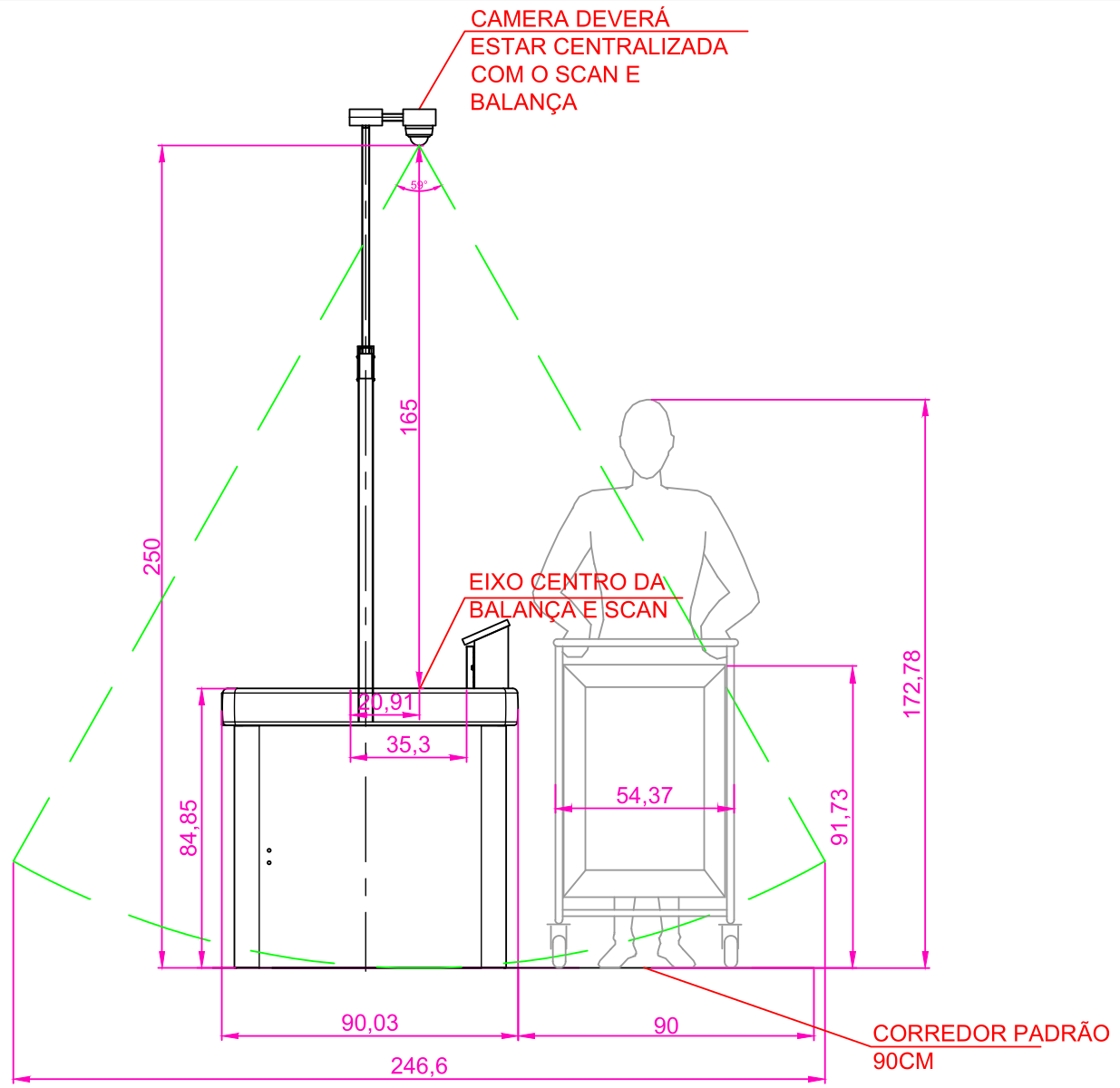
| Position | Centered on the Scan/Scale |
| Aiming | 90° (perpendicular to the counter) |
| Field of view (FOV) | ~112° |
| Height | ~2.50 m |
| Passage aisle | minimum 90 cm |

Side view — FOV ~112°, height 2.50 m
¶ 🛒 Cart Analytics — Conventional POS and Express Checkout
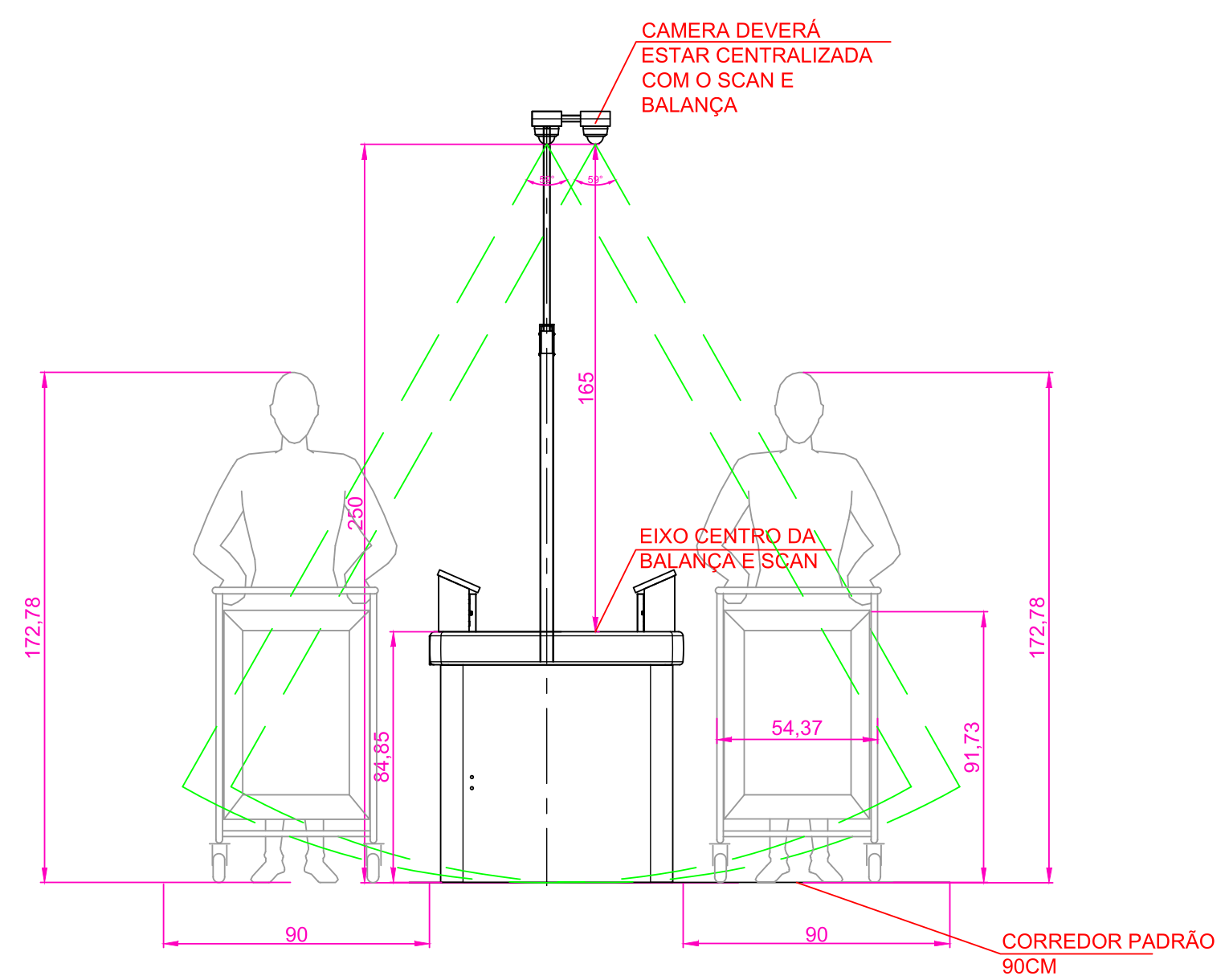
🛒 Critical section for AI. The Cart depends on correct framing of the bottom of the cart and the passage. Outside the standard, the model won't train and the go-live is delayed.
Main point:
- 90° position centered on the Scan/Scale — operation in this position is excellent. Results are consistent and highly reliable, with notable performance.
¶ 🧍 Self AI Analytics — Self-Checkout
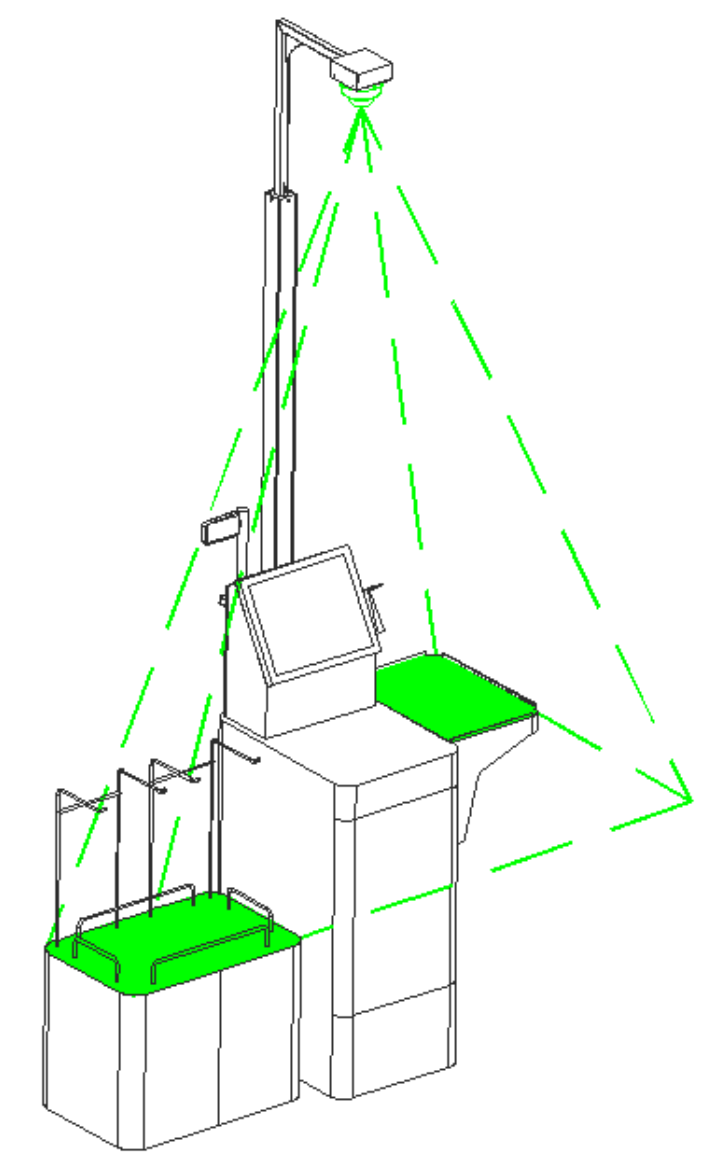
🧍 Critical section for AI. Self operates without a fixed operator — the frame must cover the scanning/bagging area from start to finish.
Technical installation criteria:
- Field of view must fully cover the tray and the scale
- Prioritize the tray in the image composition
- Avoid obstructions from mounts or components
- Minimize blocking by the customer
- Preserve continuous visibility
- Prioritize image quality for AI
¶ 📊 Efficiency classification
| Position | Condition | Efficiency |
|---|---|---|
| 🟢 A | Centered on the Scan/Scale at 90° | Excellent |
| 🟡 B | Small lateral offset | Satisfactory |
| 🔴 C | Extreme or off-axis position | Low |
¶ Supported scenarios
- Conventional POS — larger counter, belt, cart
- Express Checkout — compact structure, fast flow
- Self-Checkout — operated by the customer, no fixed operator
⚠️ The pole and mount must be rigidly fixed, without sway or vibration. An unstable structure compromises the image and the system's analysis. Fine lens adjustment is always done in the field.
📄 Full documents: Technical Description – Darwin Camera Positioning (R01) · Technical Description – Self AI, Camera Positioning (R00)
¶ 🏠 Store Infrastructure
¶ Cabling per POS
- network for camera
- network for phone
- network for integration
- audio cable
- power point
¶ Rack and network
- 19" rack (minimum 24U)
- gigabit switch
- PoE recommended
👉 Full infrastructure standard
¶ 🌐 Network & Communication
Summary of the main firewall rules (store outbound to the cloud):
| Service | Destination | Port |
|---|---|---|
| Web / API | *.easi.live |
443 TCP/UDP |
| Telemetry | mqttv2.easi.live |
8883 / 1883 TCP |
| Live video | stun.br.easi.live |
3478 TCP/UDP |
| Video (dynamic RTP) | — | UDP 1024–65535 |
| Packages / installers | storage.easi.live |
443 TCP |
| Monitoring (Darwin Agent) | monitore.svc.easi.live |
443 TCP |
| Time (NTP) | ntp.easi.live, a.ntp.br |
123 UDP |
| EAS (Web Enable) | webenable.easi.live |
9000 TCP |
⚠️ Always allow by FQDN (never by IP) and without SSL inspection on
*.easi.live.
💡 This is the summary view. The complete rules (routing/NAT, telephony, connectivity validation, and bandwidth) are in the technical manual. Table evolving — new rules will be added as the project is finalized.
👉 Full technical network and firewall manual
¶ 📋 Sales Checklist
To support the initial site survey, we provide the Darwin deployment sales checklist.
This document must be filled out before the project starts, ensuring prior validation of the store's infrastructure and topology.
¶ 📝 Required information
¶ Store identification
- unit name
- store number
¶ Features
- VoIP usage
- No Scan usage
- number of AI points (analytics)
- EAS (anti-theft) usage and number of antennas
¶ IP addressing
- server IP
- DVR/NVR IP
- camera IPs (when IP)
- cascading IP (if applicable)
- remote access IP
¶ Infrastructure
- number of switches
- switch where the Darwin server will be
- switch where the DVR/NVR will be
¶ Equipment
- brand
- model
¶ Remote access
- VNC
- Umbra (for Conecto)
- HTTP
⚠️ Filling out the checklist correctly is essential to validate the topology and avoid deployment problems.
¶ 🖥️ Remote Operation (Monitors and Supervisors)
Remote monitoring is done through the easi.live site, always in Google Chrome.
¶ Inwave Authorizer
Application installed on the remote supervisor's machines. It allows actions such as unlocking POS directly from the portal. There are three versions, depending on the POS front end:
| Store scenario | Version |
|---|---|
| Standard Windows POS, without Umbra | VNC |
| POS with Conecto (Umbra) and supervisor screen | Umbra with Front |
| POS with Conecto (Umbra), without supervisor screen | Umbra without Front (v2) |
¶ Operation best practices
- close VNC and video windows after each session
- 1 user + 1 extension = 1 machine (no repetition)
- clear Chrome cache and cookies once a week
- check Chrome updates once a week
👉 Full guide – Operation reinforcement for monitors
¶ 🔐 Data Protection, Communication, and Operational Continuity
🌐 Connectivity and Communication
- secure communication via TLS
- store-to-cloud traffic (outbound)
- use of HTTPS, MQTT, and WebRTC
Main services:
- HTTPS (443)
- MQTT (1883 / 8883)
- STUN / WebRTC
- NTP
📌 Best practices:
- avoid inspecting proxy
- avoid active load balancing
- keep a stable route
📦 Database
- MongoDB and MariaDB
- controlled access (RBAC)
- no public exposure
- automatic backups
🛡️ Security and Monitoring
- continuous monitoring
- vulnerability management
- access control
- logs and auditing
🧪 Operational Continuity
- offline operation with local buffer
- automatic sync after reconnection
- cloud backups
- tested recovery
¶ 🔗 Integrations
Darwin can integrate with:
- point of sale
- scales
- EAS (antennas, deactivators, and anti-theft alarms)
- partner systems