¶ 📘 Darwin Integration Manual
Public guide with general instructions for integrating the Darwin system with POS front ends and partner systems.
🔐 Some integrations have detailed instructions restricted to the Internal Integration Guide.
¶ 📑 Table of contents
¶ 🧭 Overview
The integration between Darwin and the POS front-end system enables real-time monitoring of POS operations. Each partner has a specific configuration method, described in the sections below.
Before you start, have on hand:
- 🌐 IP of the store's Darwin server
- 🔌 Darwin server port (usually
23454) - 🖥️ Administrative access to the POS front-end system
- 📂 Permission to edit configuration files on the POS
⚠️ Important: After any change and load on the POS, you must restart the POS front-end application for the integration to take effect.
¶ 🔄 Integration Types
The table below summarizes the integration types supported by each partner system. Click the system name to access the detailed instructions.
| System | Default | TopSistemas | EAS Alarm* | No Scan* | Telephony* | TopSistemasV2* | Toledo Scale* |
|---|---|---|---|---|---|---|---|
| Ciss Software | ✅ | ✅ | ✅ | ✅ | ✅ | ||
| Conecto | ✅ | ✅ | ✅ | ✅ | ✅ | ||
| Consinco | ✅ | ✅ | ✅ | ✅ | ✅ | ||
| Diebold | ✅ | ✅ | ✅ | ✅ | ✅ | ||
| Guia Sistemas | ✅ | ✅ | ✅ | ✅ | ✅ | ||
| Kw / Arius | ✅ | ✅ | ✅ | ✅ | ✅ | ||
| MaxiPOS | ✅ | ✅ | ✅ | ✅ | ✅ | ||
| NCR | ✅ | ✅ | ✅ | ✅ | ✅ | ||
| PDV Lumi | ✅ | ✅ | ✅ | ✅ | ✅ | ||
| RP Info | ✅ | ✅ | ✅ | ✅ | ✅ | ||
| Socin | ✅ | ✅ | ✅ | ✅ | ✅ | ||
| Solidcom | ✅ | ✅ | ✅ | ✅ | ✅ | ||
| Sysmo S1 | ✅ | ✅ | ✅ | ✅ | ✅ | ||
| Sysmo Veraz | ✅ | ✅ | ✅ | ✅ | ✅ | ||
| Tecnix | ✅ | ✅ | ✅ | ✅ | ✅ | ||
| TopSistemasV2 | ✅ | ✅ | ✅ | ✅ | ✅ | ||
| VR Software | ✅ | ✅ | ✅ | ✅ | ✅ | ||
| Visual Mix | ✅ | ✅ | ✅ | ✅ | ✅ | ||
| Winthor-TOTVS | ✅ | ✅ | ✅ | ✅ | ✅ | ||
| Zanthus | ✅ | ✅ | ✅ | ✅ | ✅ |
*Optional features — check availability per contract.
¶ 🔎 Integrations
¶ 🟦 Ciss Software
Integration type: Gatecash → TopSistemas
¶ Configuration
Configure Gatecash pointing to the Darwin server as shown in the image below:
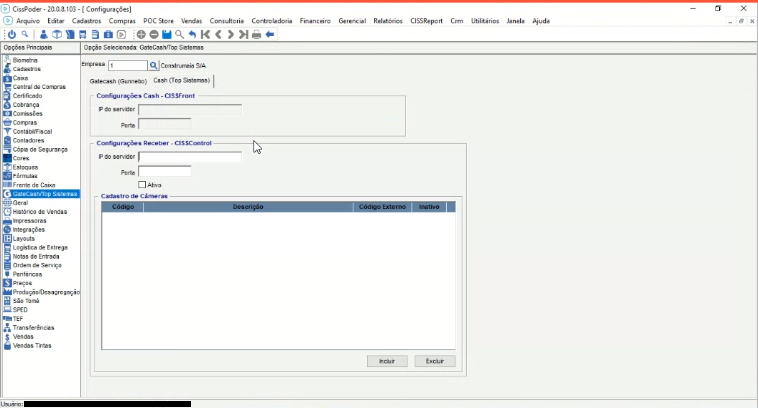
⚠️ Finally, when the POS receives the load, you'll need to restart the POS front-end application.
¶ 🟦 Conecto
Configuration file: GLOBAL.xml
¶ Snippet to add/edit
<CCTV_TYPE>2</CCTV_TYPE>
<CCTV_DIR>IP:PORTA</CCTV_DIR>
Replace IP and PORTA with the store's Darwin server values.

⚠️ Finally, when the POS receives the load, you'll need to restart the POS front-end application.
¶ 🟦 Consinco
Path: Settings → POS Settings → Monitoring
¶ Parameters
- Model: Top Sistemas
- IP: Darwin server IP
- Port: Darwin server port
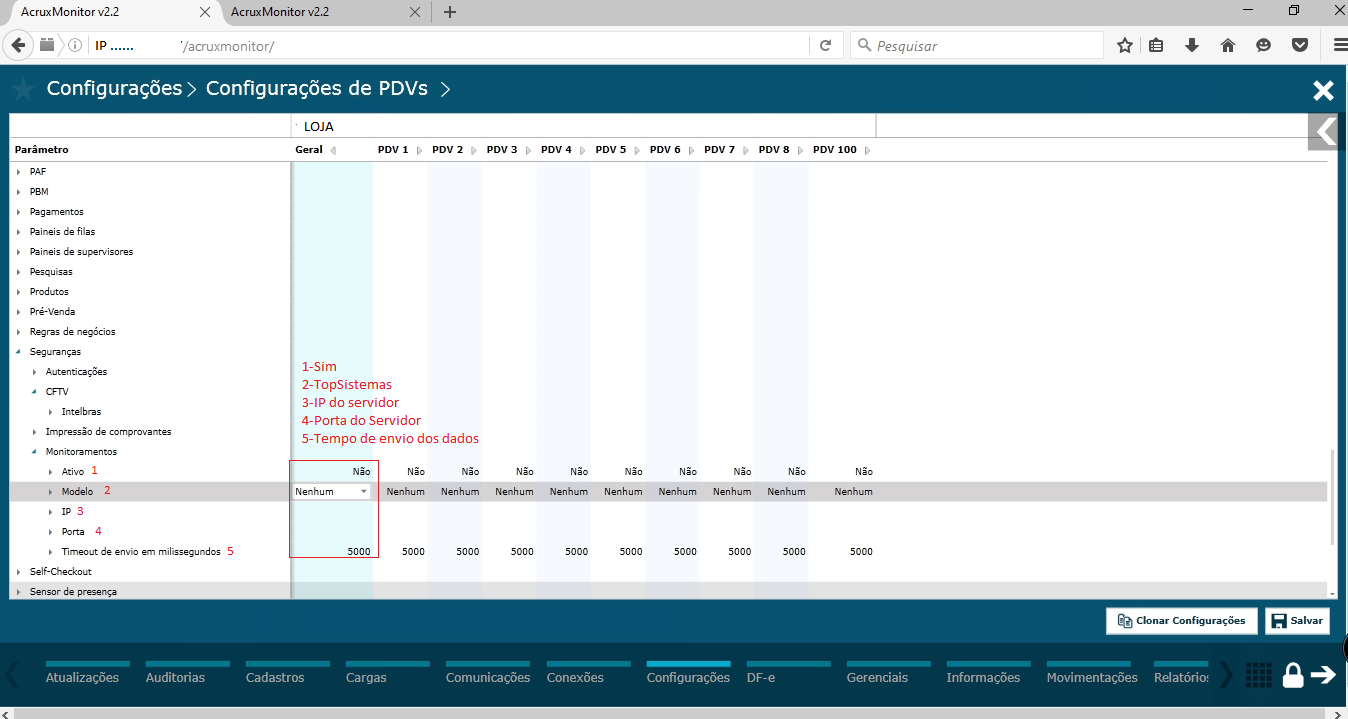
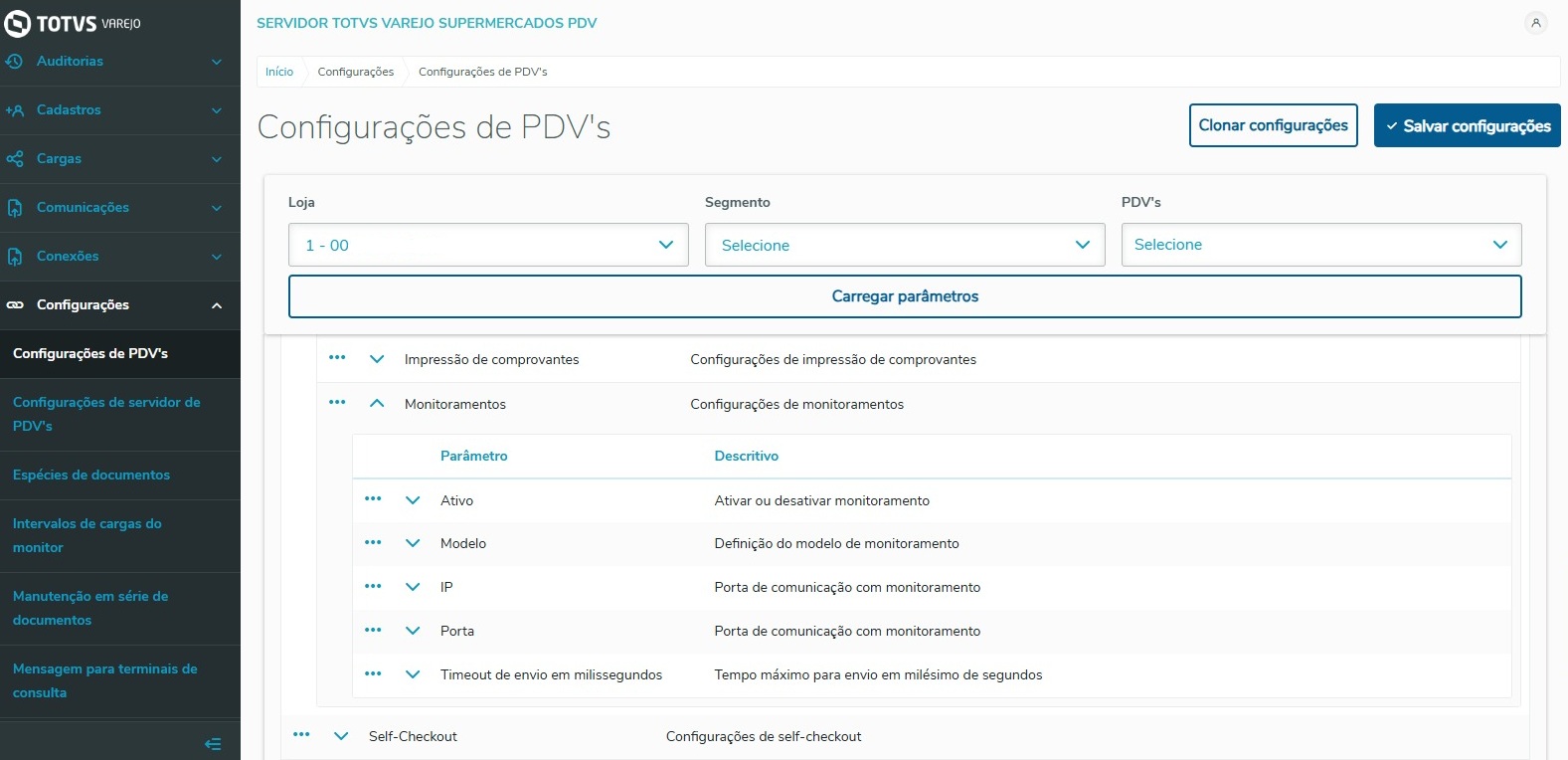
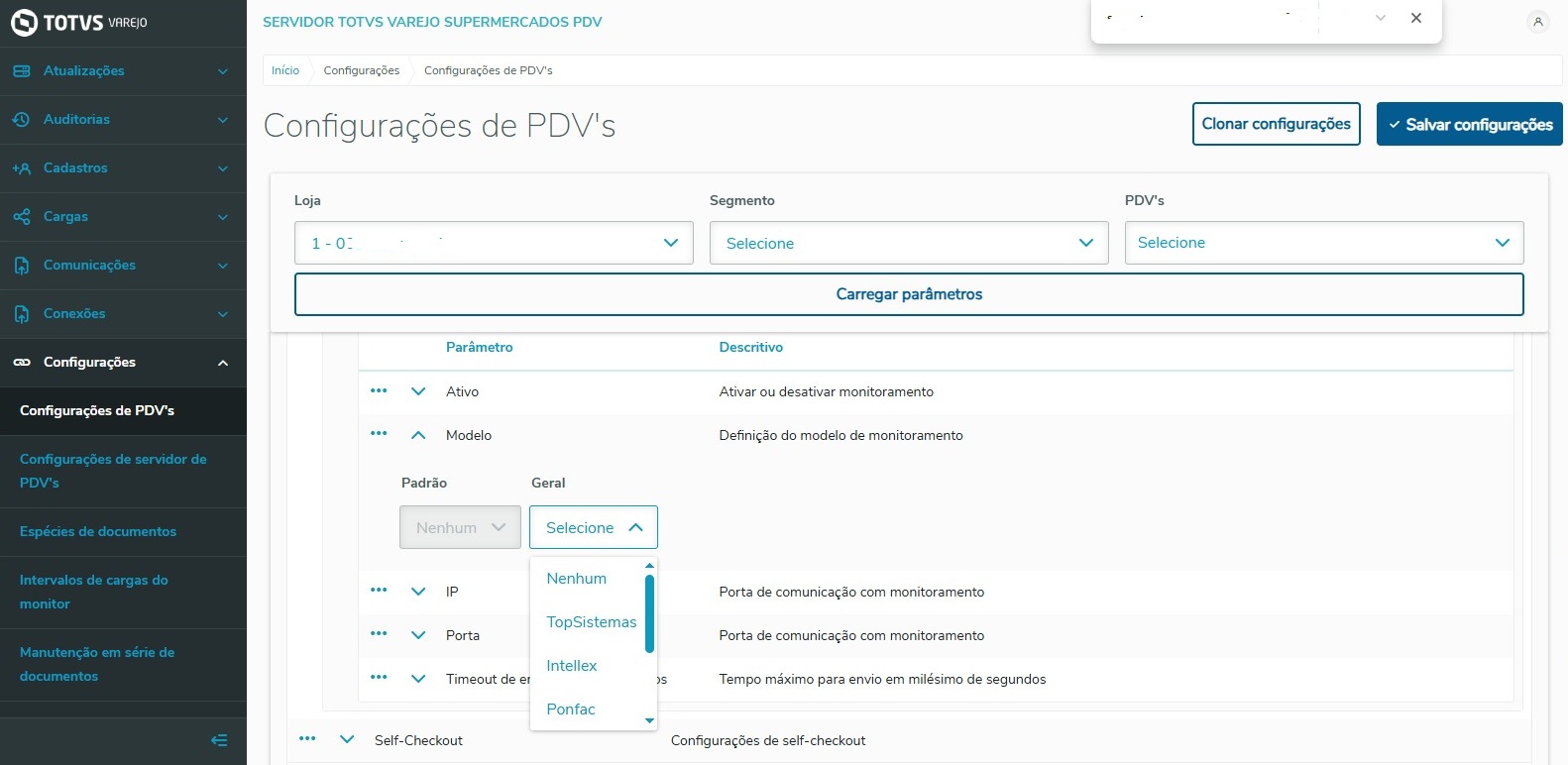
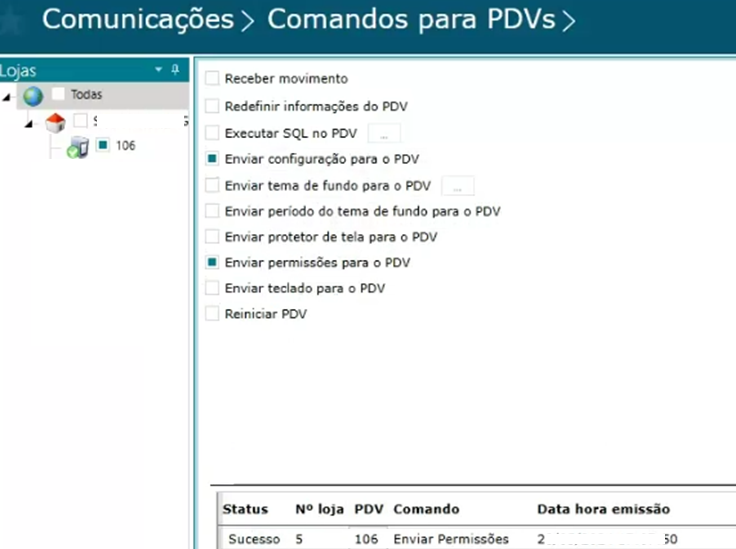
⚠️ Finally, when the POS receives the load, you'll need to restart the POS front-end application.
¶ 🟦 Diebold
🔐 Detailed instructions are available only in the internal manual.
Go to: Internal Integration Guide
¶ 🟦 Guia Sistemas
Configuration tool: CxConfig + .ini files
¶ Visual step-by-step
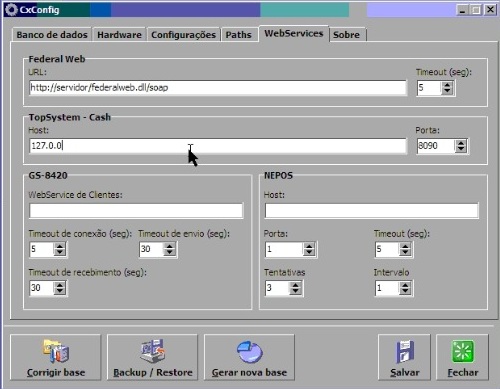
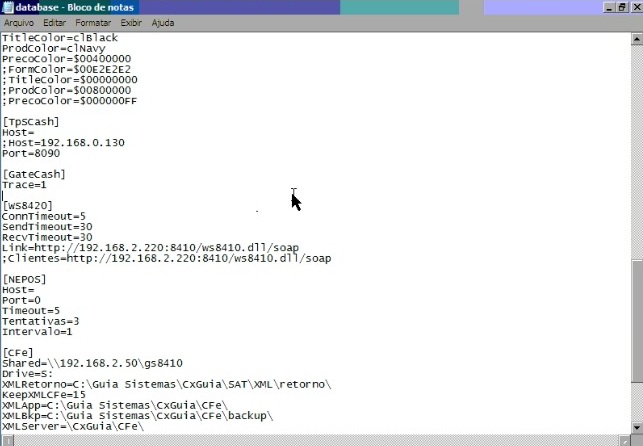
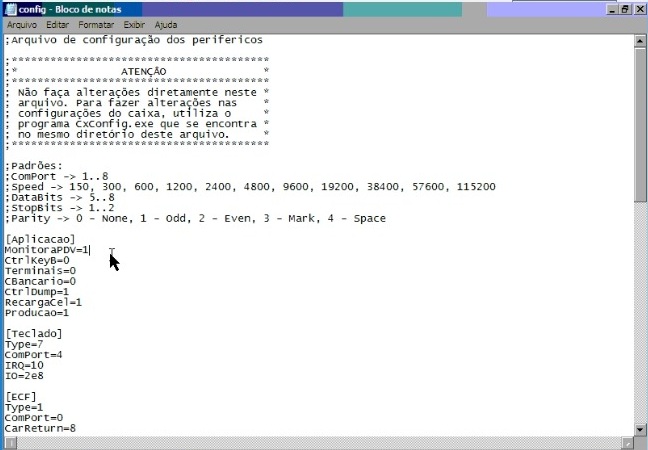
⚠️ Finally, when the POS receives the load, you'll need to restart the POS front-end application.
¶ 🟦 Kw / Arius
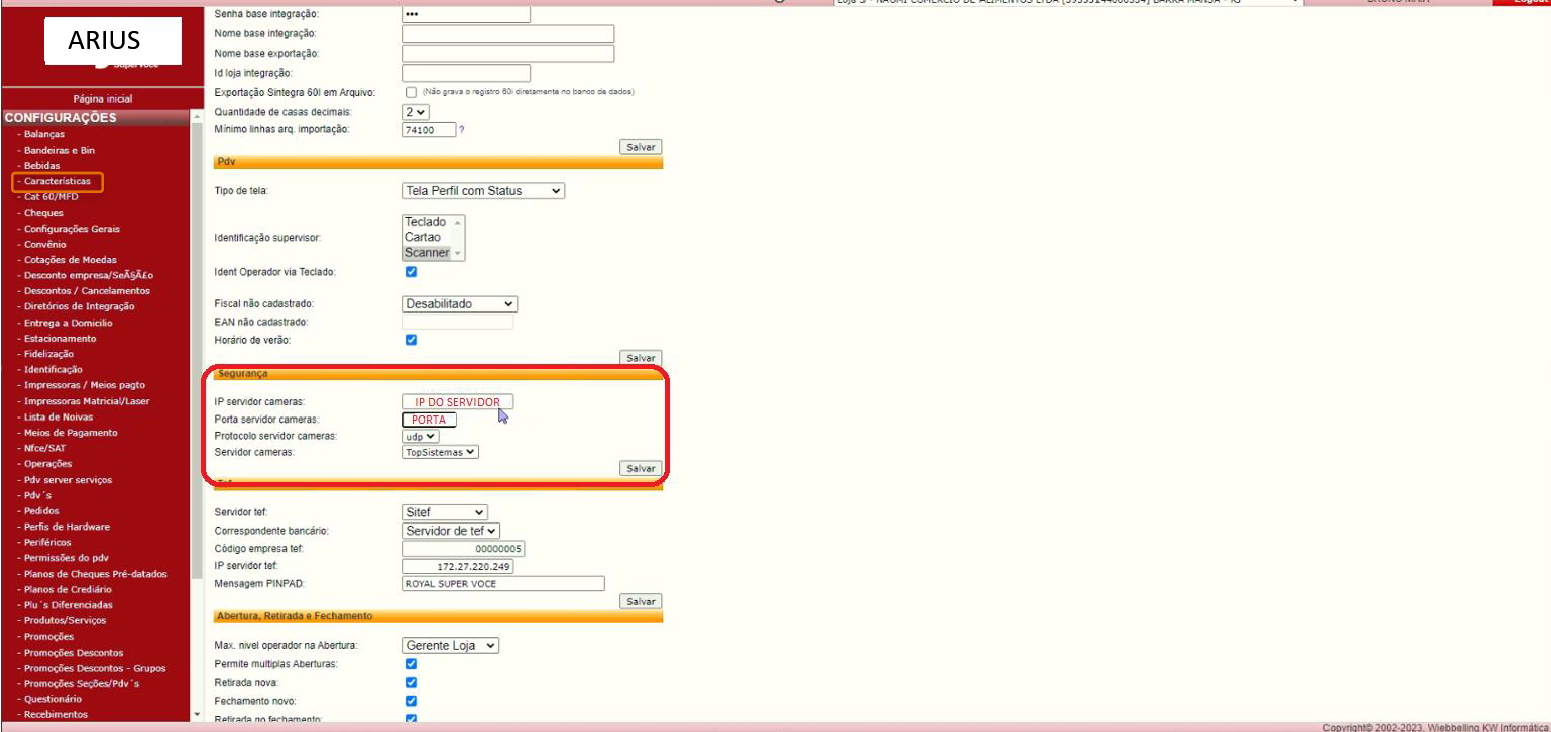
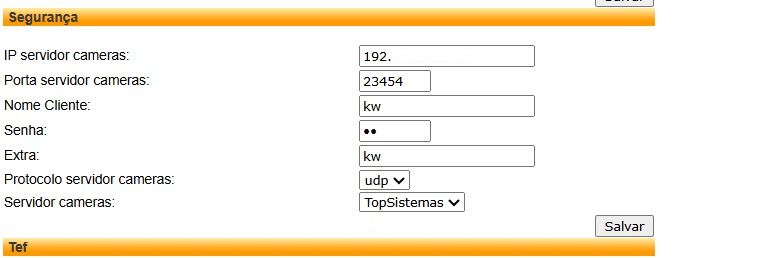
Path: Settings → Characteristics
Protocol: UDP
¶ 1. Configure the integration
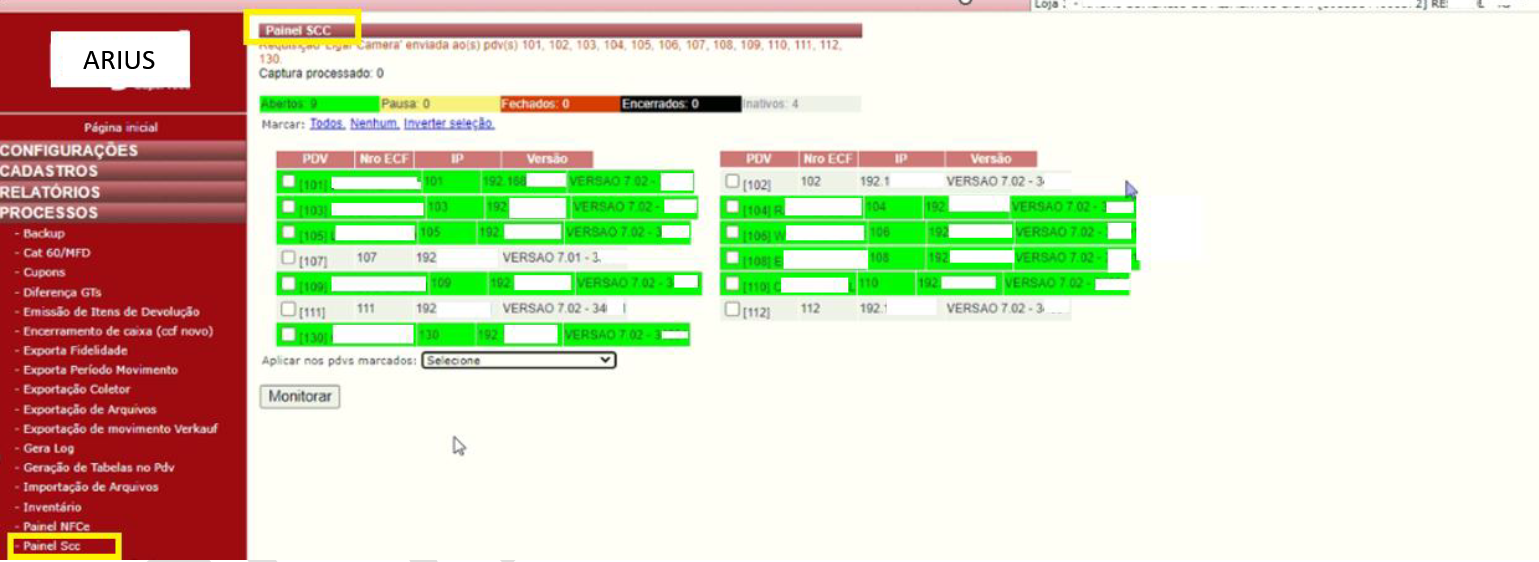
¶ 2. Perform the load at the store
⚠️ Finally, when the POS receives the load, you'll need to restart the POS front-end application.
¶ 🟦 MaxiPOS
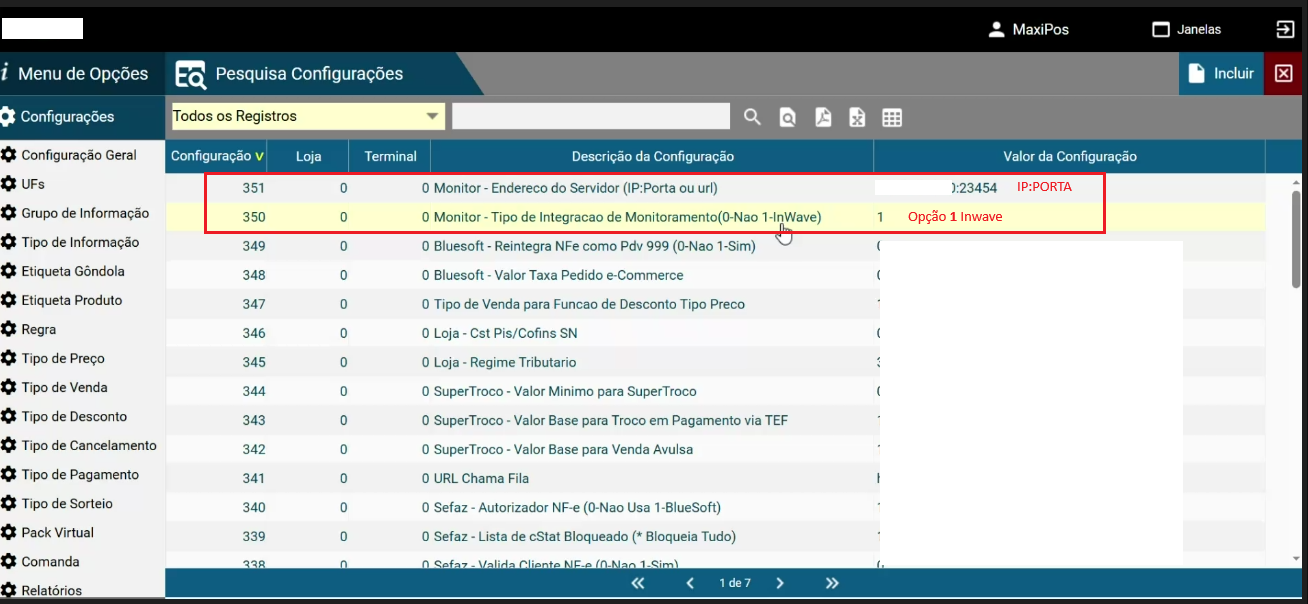
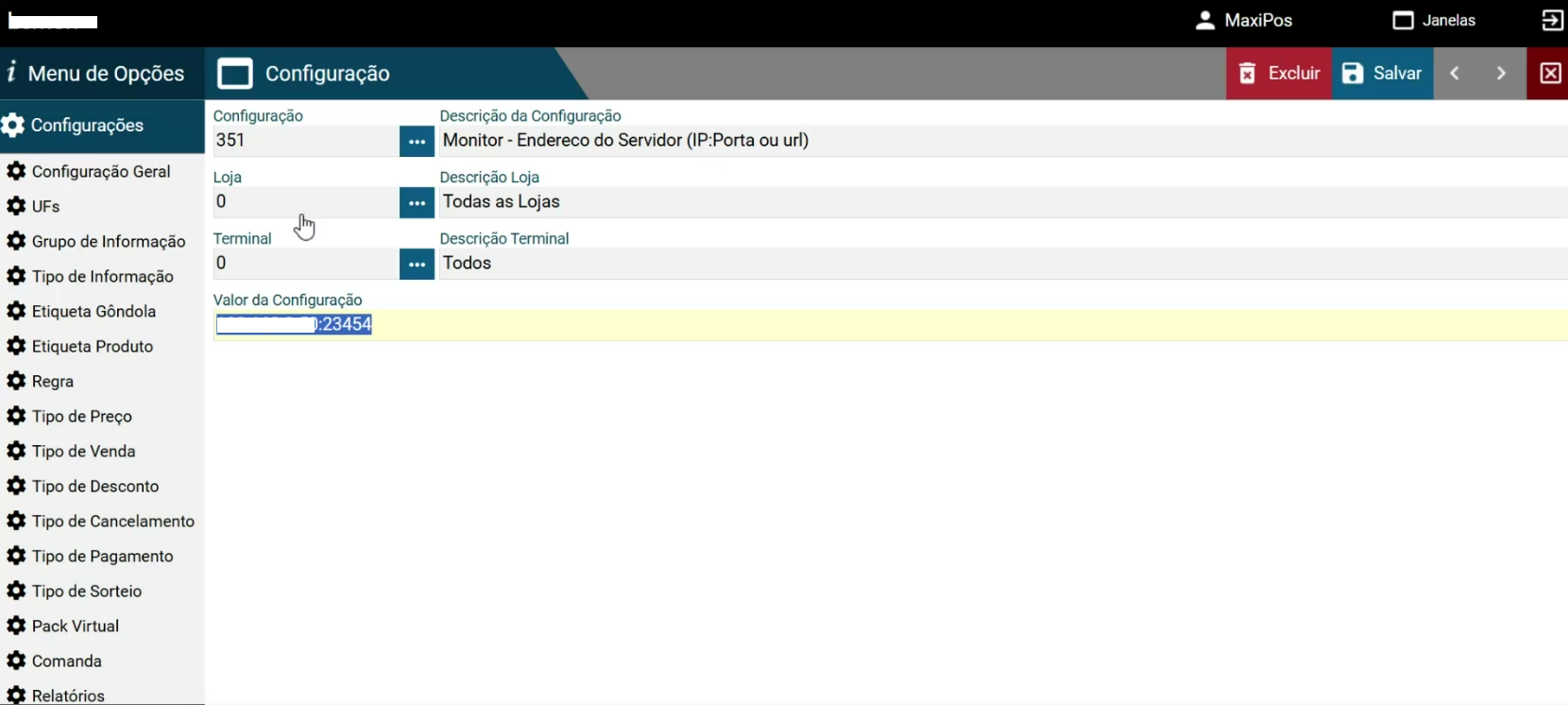
Path: Settings → Options 350 and 351
¶ Parameters
| Option | Description | Value |
|---|---|---|
| 350 | Monitor - Monitoring Integration Type (0-No, 1-InWave) | 1 (InWave) |
| 351 | Monitor - Server Address (IP:Port or URL) | IP_DARWIN:PORTA |
¶ 🟦 NCR
Configuration type: Library replacement
¶ Step-by-step
- Back up the original
libGCPlug.solibrary on the NCR POS - Replace it with the Darwin/EasiCash library provided by support
📞 To get the correct library, contact technical support.
¶ Logs for diagnosis
/var/log/oki/siac-store-pos/cftv/gcecho*
🔐 Detailed instructions are available only in the internal manual.
Go to: Internal Integration Guide
¶ 🟦 PDV Lumi
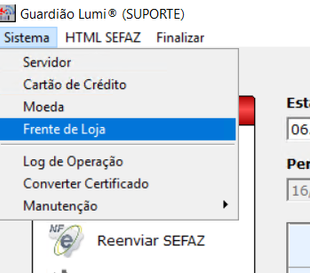
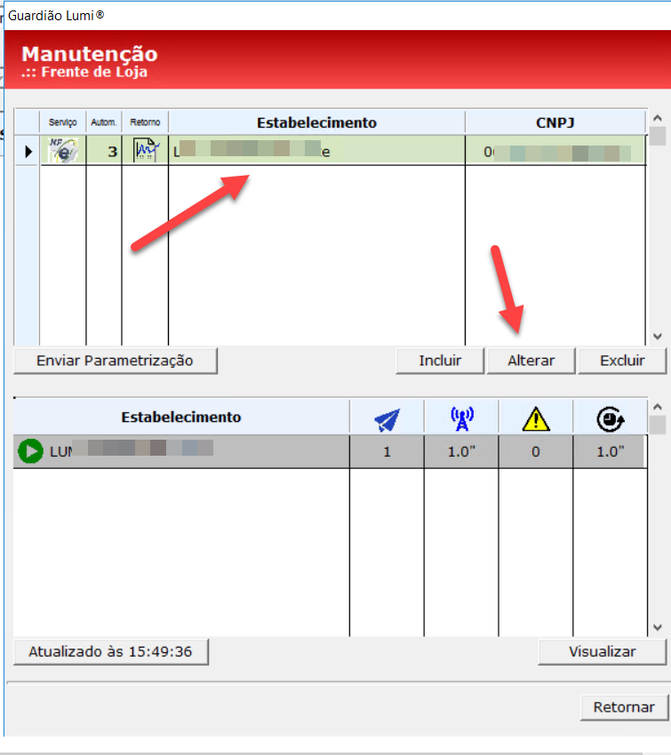
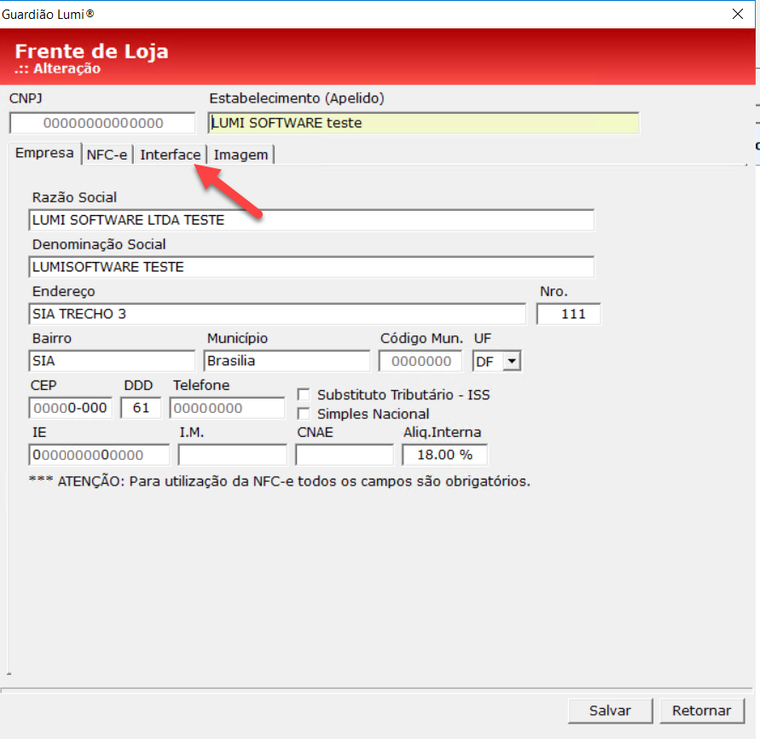
Configuration file: config.ini
¶ Configuration sequence

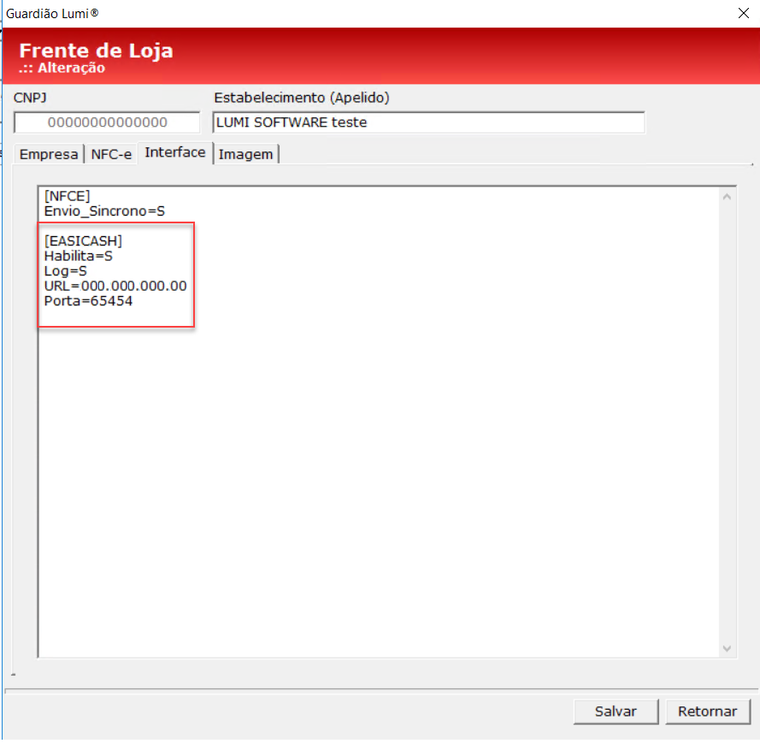
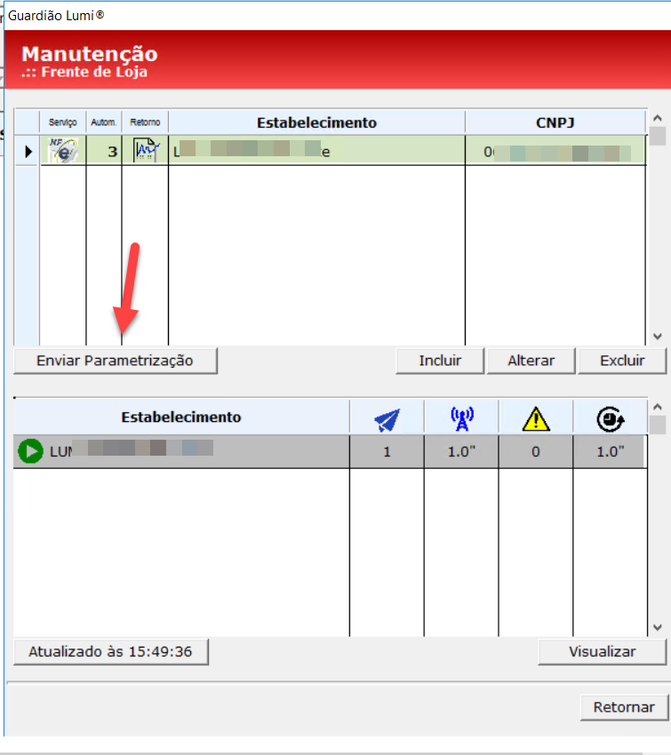
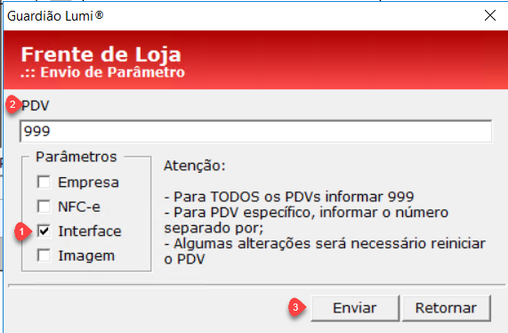
⚠️ Finally, when the POS receives the load, you'll need to restart the POS front-end application.
¶ 🟦 RP Info
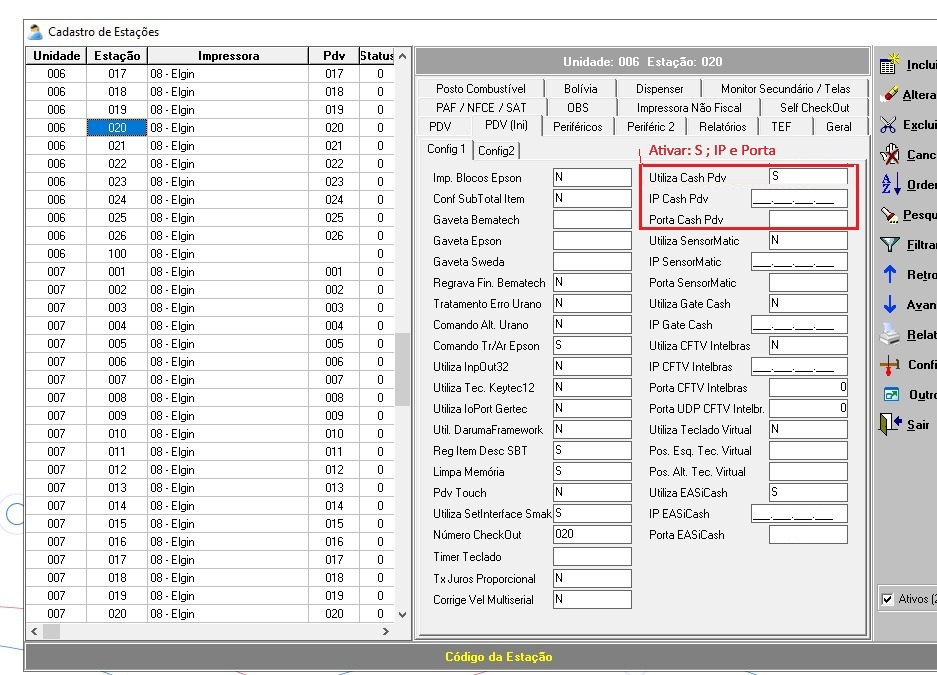
Configuration is done directly on the POS.
¶ Parameters
- IP: Darwin server IP
- Port:
23454or2345
⚠️ Finally, when the POS receives the load, you'll need to restart the POS front-end application.
¶ 🟦 Socin
Path: Concentrator → Load → Scheduling
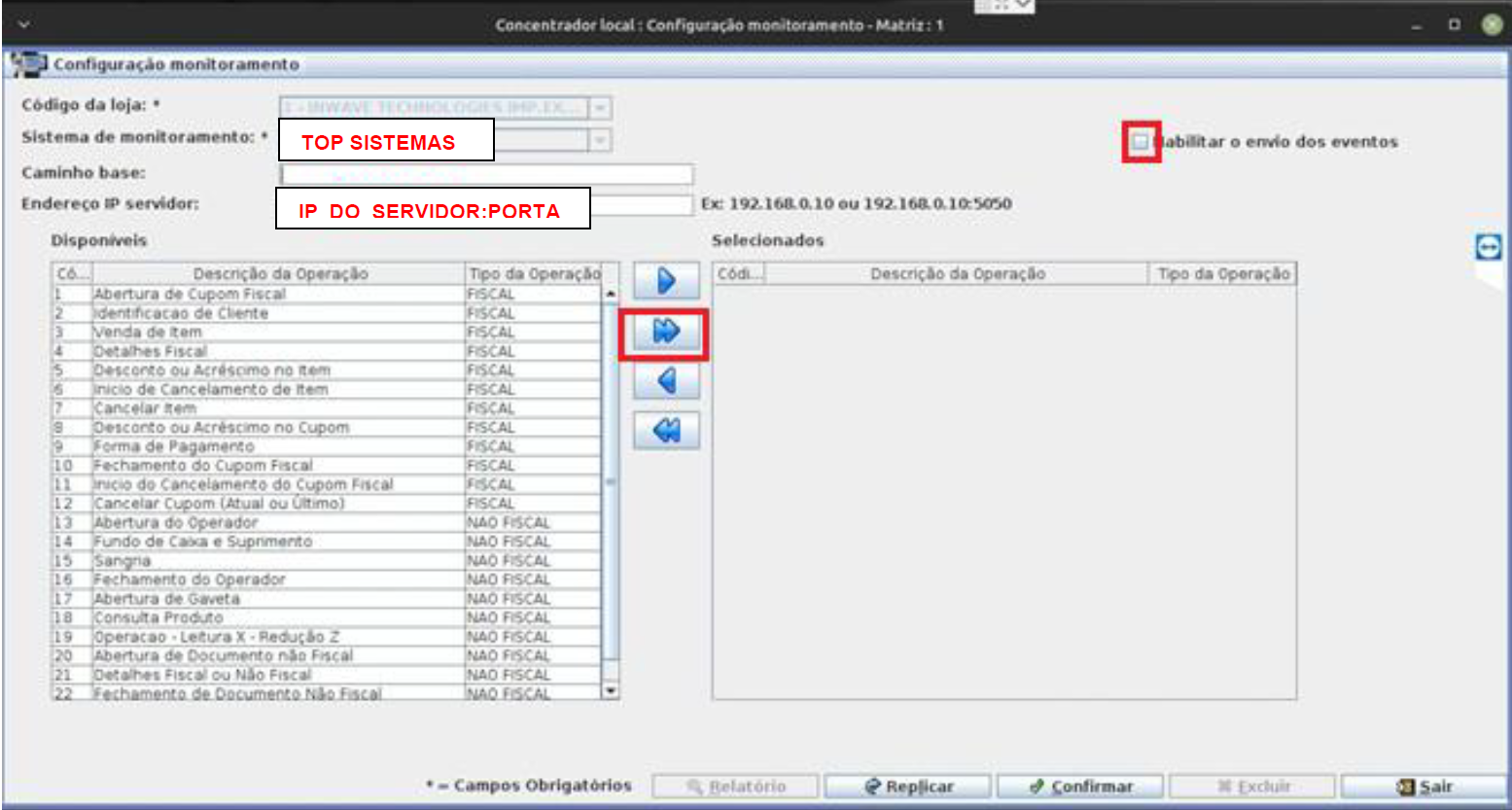
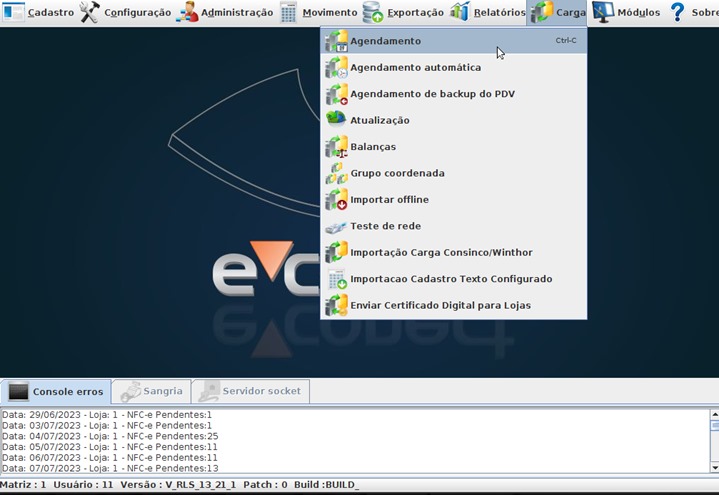
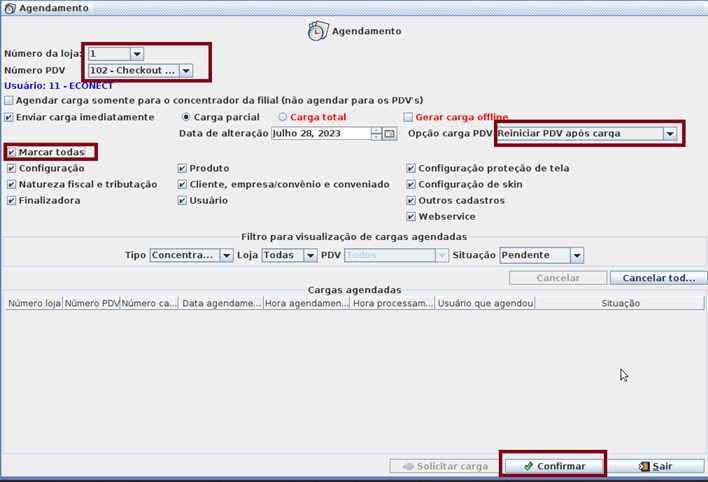
⚠️ Finally, when the POS receives the load, you'll need to restart the POS front-end application.
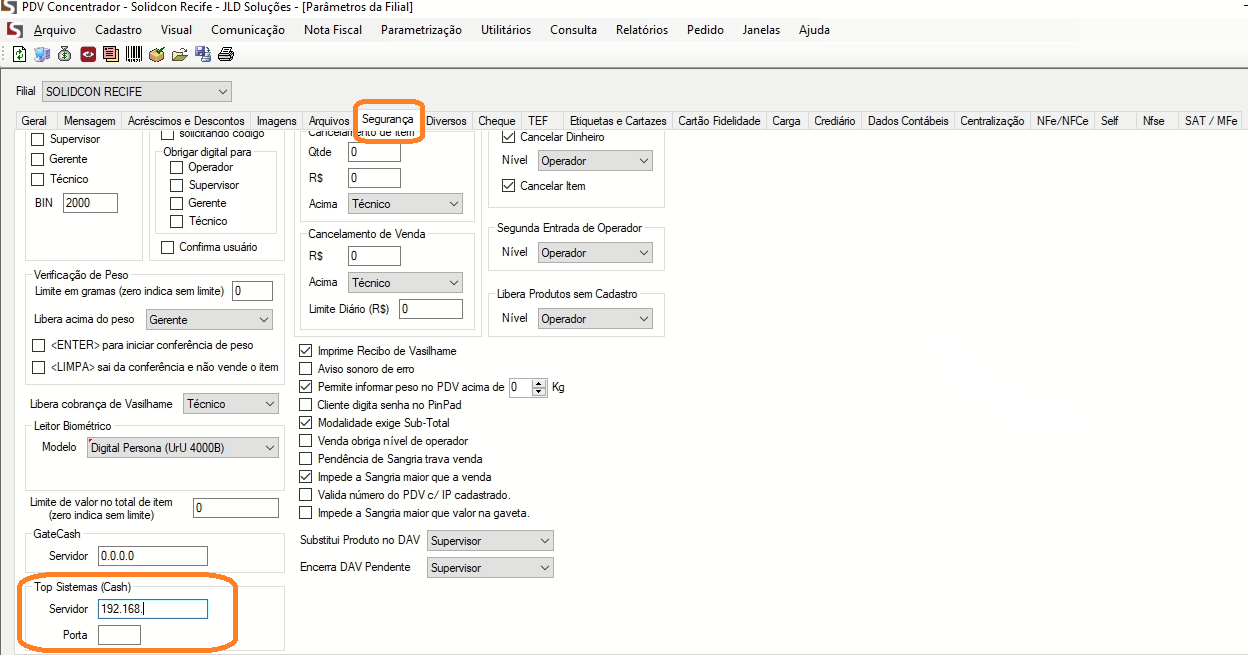
¶ 🟦 Solidcom
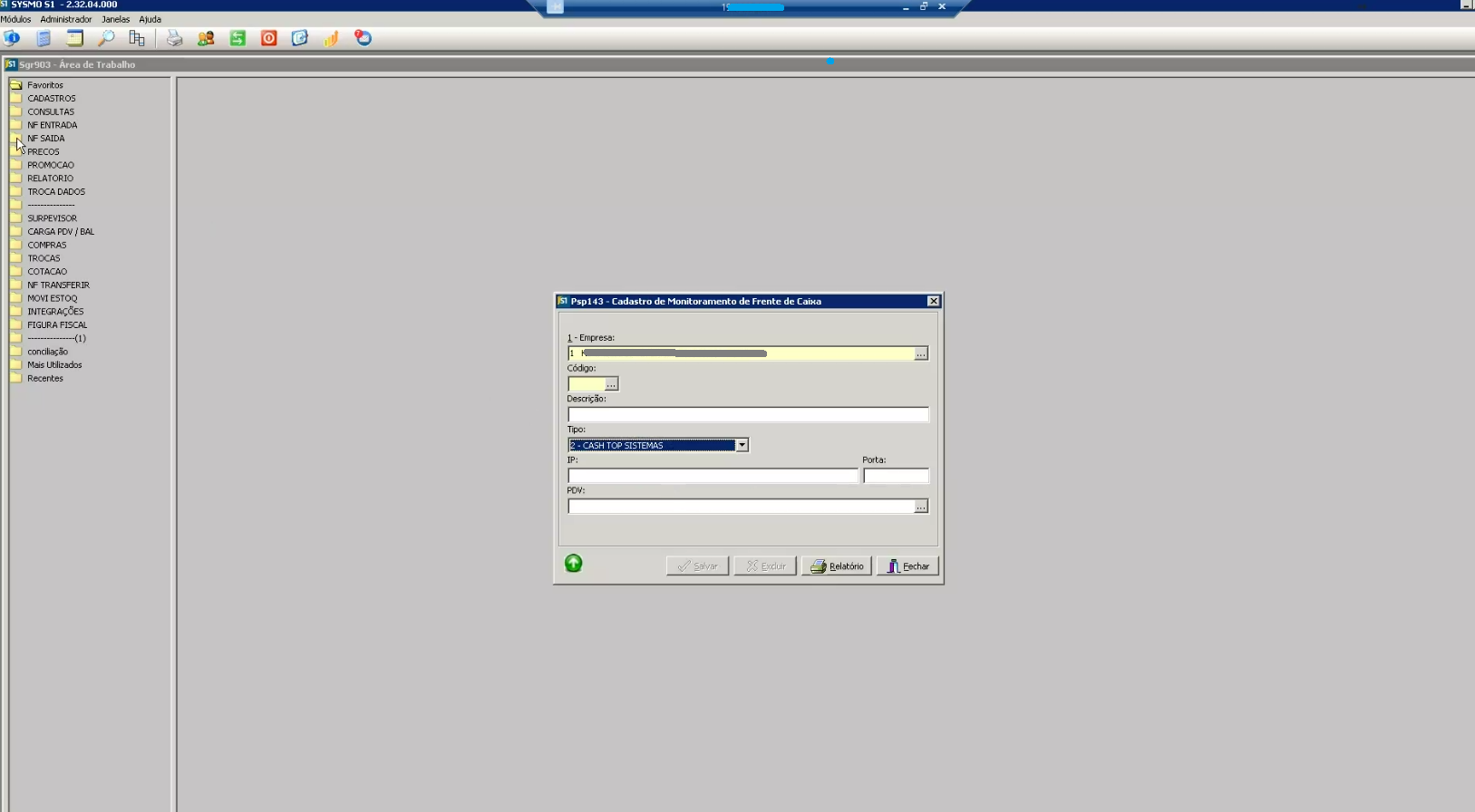
¶ 🟦 Sysmo S1
Path: POS Menu → Monitoring
⚠️ Finally, when the POS receives the load, you'll need to restart the POS front-end application.
¶ 🟦 Sysmo Veraz
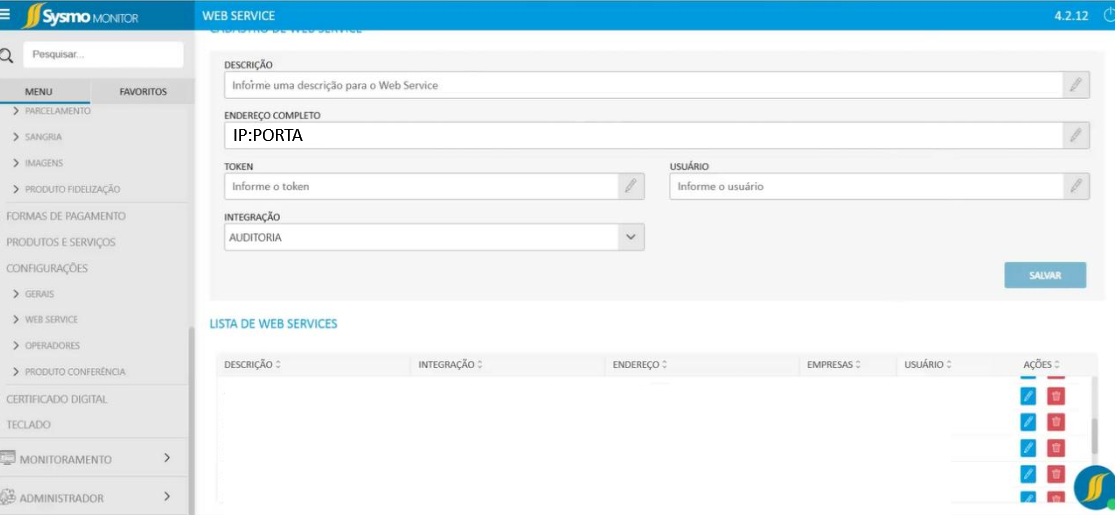
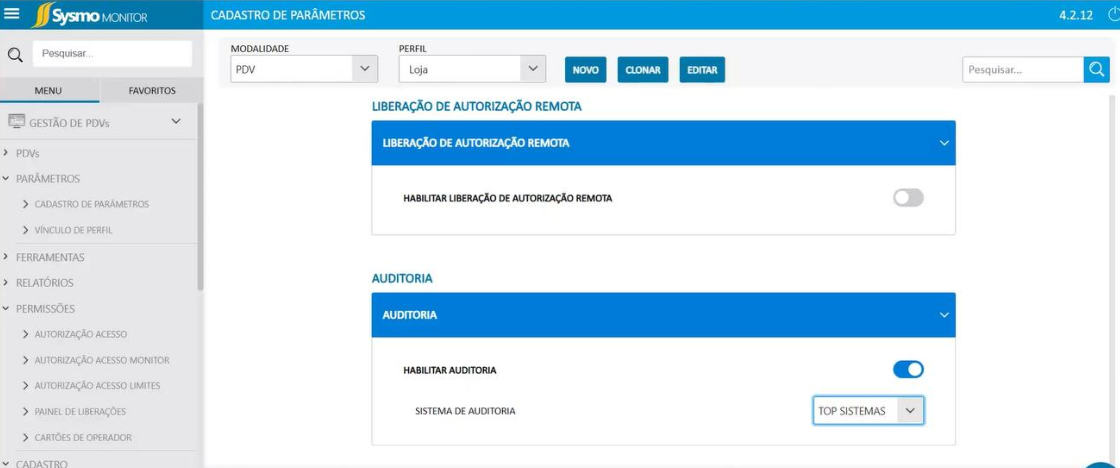
Configuration is done in two steps:
¶ 1. Configure the Web Service
Path: MENU → SETTINGS → WEB SERVICE
Configure the IP and port of the Darwin server.
¶ 2. Enable Auditing
Path: POS MANAGEMENT → PARAMETERS → REGISTRATION → AUDITING
Enable the Top Sistemas integration.
⚠️ Finally, when the POS receives the load, you'll need to restart the POS front-end application.
🔐 Detailed instructions are available only in the internal manual.
Go to: Internal Integration Guide
¶ 🟦 Tecnix
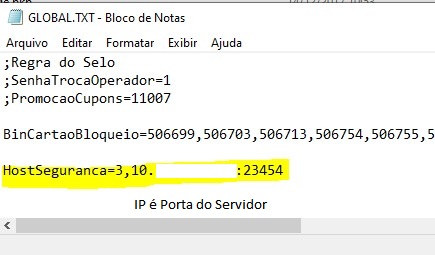
Configuration file: GLOBAL.TXT
¶ Snippet to add
HostSeguranca=PDV,IP:PORTA
Replace IP and PORTA with the Darwin server values.
⚠️ Finally, when the POS receives the load, you'll need to restart the POS front-end application.
¶ 🟦 TopSistemasV2
🔐 Detailed instructions are available only in the internal manual.
Go to: Internal Integration Guide
¶ 🟦 VR Software
Path: POS Parameters
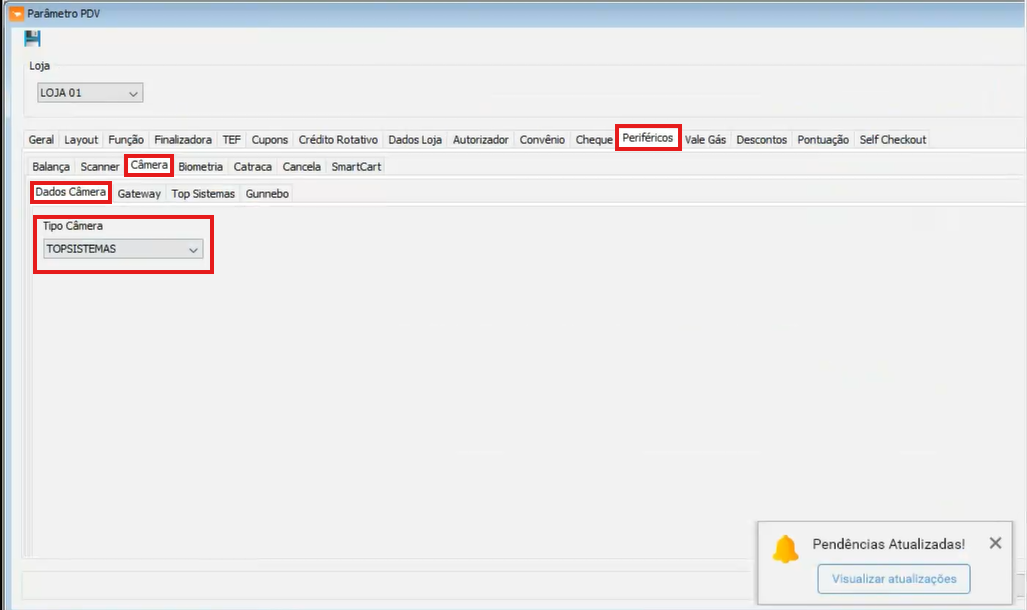
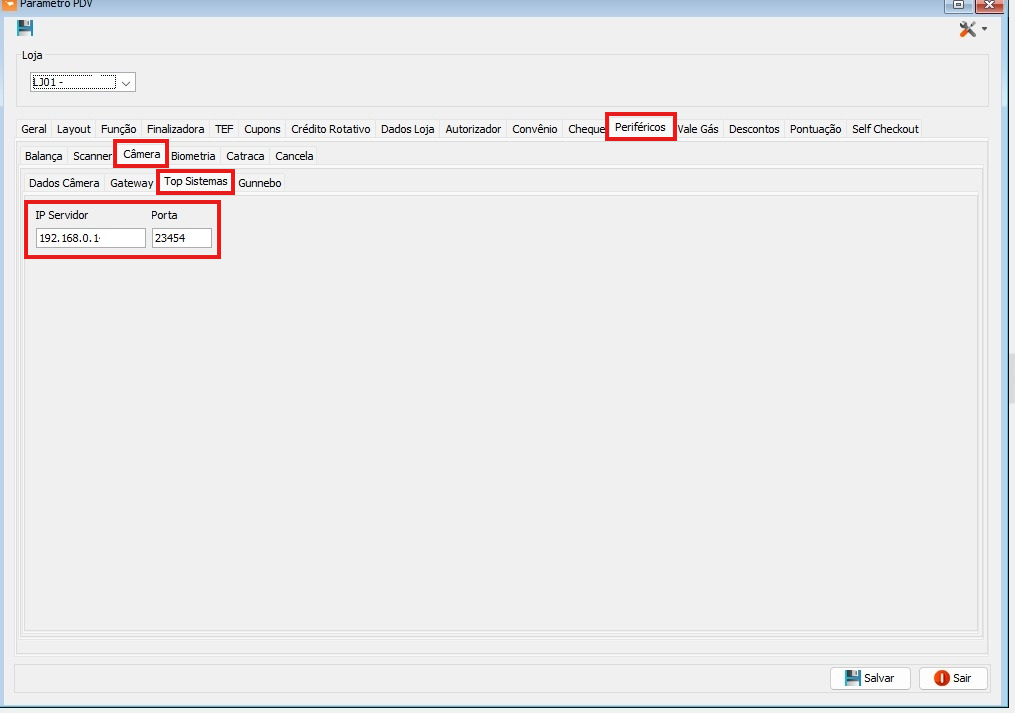
⚠️ Finally, when the POS receives the load, you'll need to restart the POS front-end application.
¶ 🟦 Visual Mix
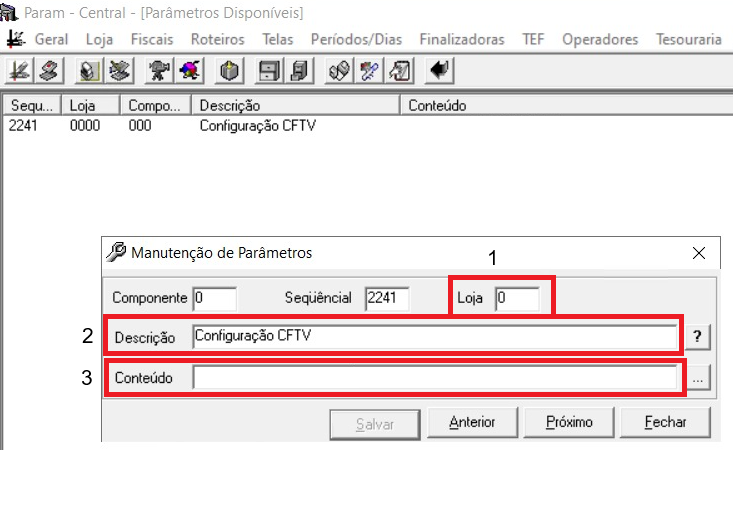
Path: Settings → Parameters → Parameter Maintenance
¶ Fields to fill in
| Field | Value | Note |
|---|---|---|
| Store | 0 |
Indicates it applies to all stores. NOTE: we use one Darwin server per store, each with its own IP. |
| Description | Configuração CFTV |
Defines the integration type |
| Content | 1,IP,PORTA,,7 |
See details below |
¶ Structure of the "Content" field
Fill in separated by commas:
1→ Top Sistemas type192.168.0.144(example) → Darwin server IP23454→ Darwin server port,,→ Leave the two empty commas by default7→ Leave it set to7by default
Final example: 1,192.168.0.144,23454,,7
¶ 🟦 Winthor - TOTVS
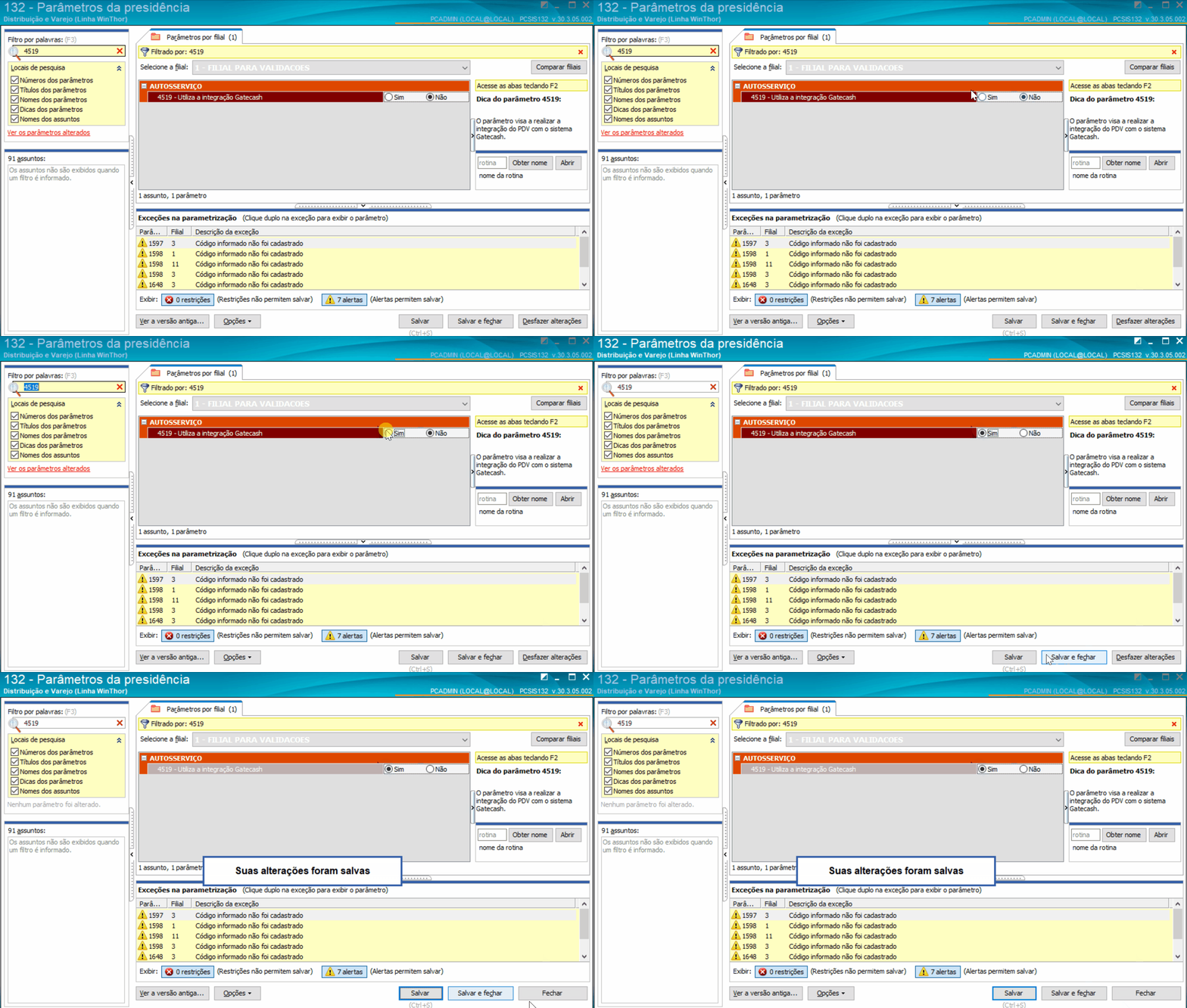
¶ 1. Enabling Gatecash
Required routines: 132 and 2044
¶ 2. Official TOTVS step-by-step
👉 TOTVS Tutorial – Gatecash Configuration
¶ 3. Visual examples
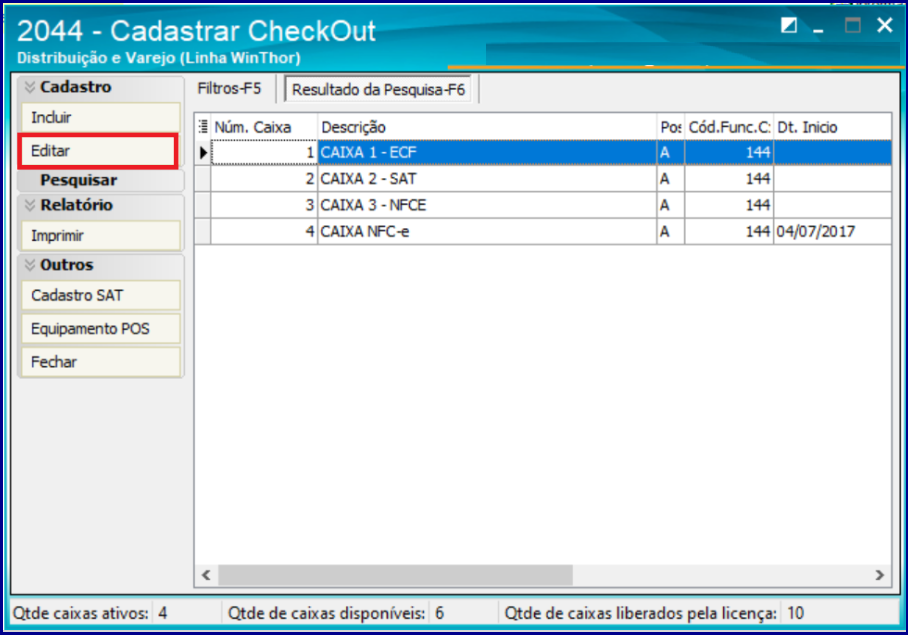
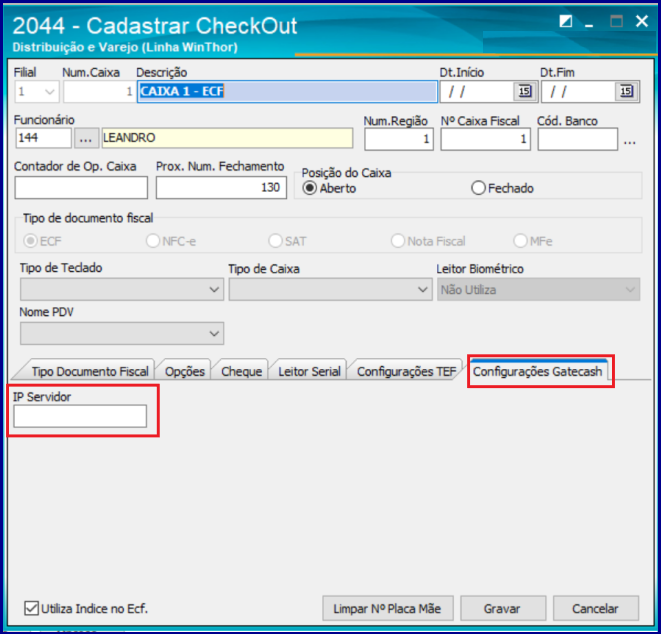
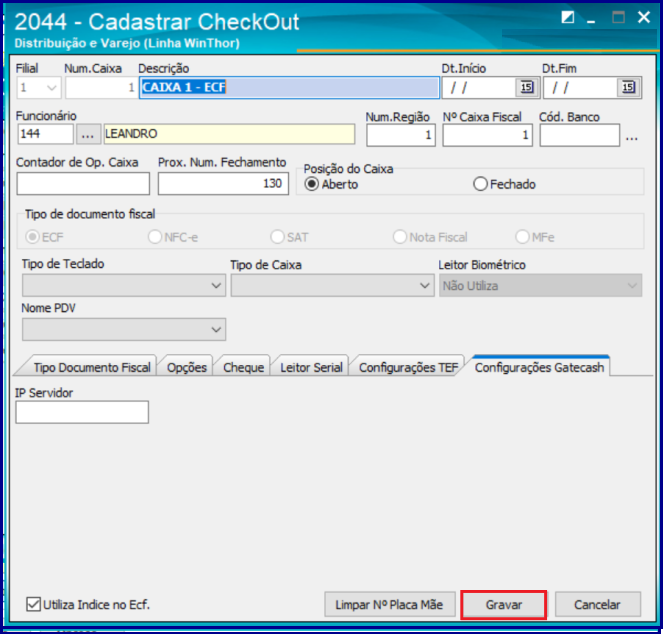
⚠️ Finally, when the POS receives the load, you'll need to restart the POS front-end application.
🔐 Detailed instructions are available only in the internal manual.
Go to: Internal Integration Guide
¶ 🟦 Zanthus
This manual guides the correct configuration of the Zeus system (POS front end) for integration with Darwin.
The integration is done through .CFG files in the application's execution directory, usually at:
/Zanthus/Zeus/pdvJava
📝 Each configuration parameter must be entered on a separate line within these files.
¶ Configuration files used
¶ ZPPERD00.CFG — General POS parameters
TIPO01=1
OPCOESLOG=255
¶ ZPPERD01.CFG — Darwin server addressing
ENDERECO=IP_DARWIN
PORTA=PORTA_DARWIN
⚠️ Finally, when the POS receives the load, you'll need to restart the POS front-end application.
🔐 Detailed instructions are available only in the internal manual.
Go to: Internal Integration Guide
¶ 📌 General Notes
- ⚠️ Always restart the POS front-end application after each load or configuration change on the POS.
- 🌐 Each store has its own Darwin server with a unique IP.
- 🔌 The default port of Darwin is
23454, but it may vary by environment. - 📞 If you have questions, contact Inwave technical support.